Rating Projector for PDGA
See your next PDGA ratings before they're published, right on your ratings detail page.
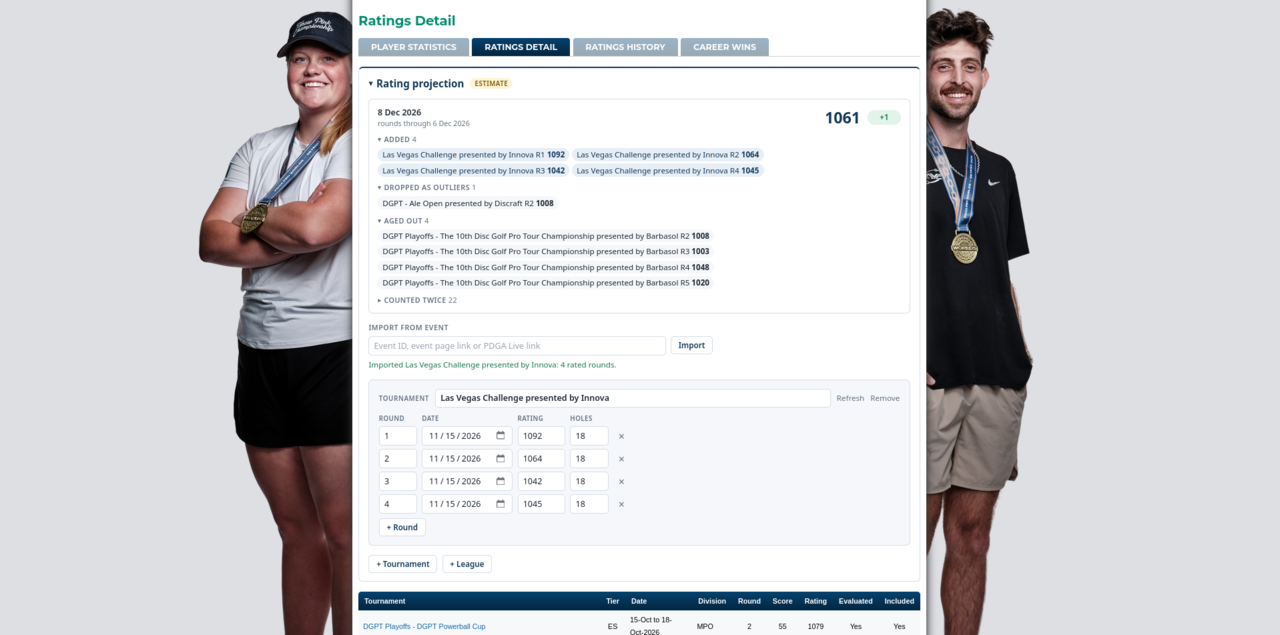
What it does
- Import an event from its ID or link, including PDGA Live links, or with one click on its event page. Refresh it as more league weeks are rated.
- Or add tournaments and leagues by hand, then add, renumber or delete rounds under them as you play.
- See every upcoming update: the projected rating and change, which rounds get added, dropped as outliers, counted twice or aged out.
- Leagues land when they end. Each league's rounds count in the update after its end date, like PDGA reports them.
- Events already in your rating are greyed out, with one click to clear them.
How to use it
- Install the extension for Chrome or Firefox.
- On pdga.com, open your player page and choose Ratings Detail.
- Import the events you've played since the last update, or add them with each round's rating.
Projections are estimates based on PDGA's published method and can be off by a point or so.